I think about this way more than is good for me, but it’s a serious question, and I think I deserve an answer: Why doesn’t Apple (MacOS) have a “Move…” command in the right-click menu? I could use this feature almost every day, more than once.
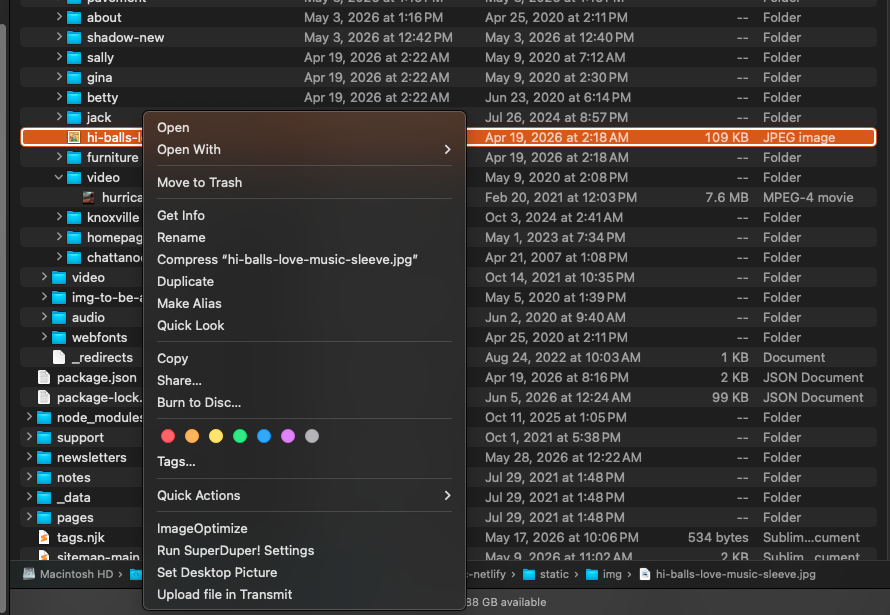
I’m gonna give you a litttle glimpse into my working methods. This screenshot below shows the /static/img/ folder of my website. It has a lot of folders in it, and a bunch of un-foldered images.

This highlighted images belongs in the “/illustrations/” subfolder, which is not visible in this view of the folder. Apple wants me to drag the file to the /illustrations/ folder, but since it’s not visible, I have to stop working, expand the window, and I still might have to scroll to display the /illustrations/ folder by which point my file might be scrolled out of view. Instead of doing that, I would like to be able to right click on the file, select the “Move…” command, and then navigate to the /illustrations/ folder. That way I only have to move one finger to put the file where it belongs, instead of all that other stuff.
But as you can see, there is no “Move…” command in the right-click contextual menu.
Windows has always had this. Do they have a patent on it or something? (If they do, when does it expire?) I know there are lots of little work-arounds Apple users can use to make moving files a little easier, like temporarily renaming the file or folder so they are alphabetically adjacent, but that’s a ridiculous work-around (that I’ve done many times).
Come on, Apple, what would be so wrong with letting us have this? Are you afraid people will think they’re using Windows?
And, readers, please let me know if you agree that the absence of a MacOS “Move…” command is an outrage. I’ll start a crusade if you’ll join it.